Solutions
Costing & Menu Engineering
Recipe Management
Inventory Control
Purchasing Management
Production Planning
Multi-Location Integration
Clients
Restaurants
Industrial Kitchen
Small Businesses
Event Catering
Bakeries & cafes
Hotels & institutional dining
Plans
Purchase management
Buy exactly what you need — no more, no less.
Shopping lists are generated automatically based on your inventory and production plan. Create orders by supplier, receive against XML invoices, and monitor the entire flow.

Active orders
18
12 delivered today
Monthly savings
$8,420
Best price62%
Suppliers
24
8 with active order
The problem
Disorganized purchasing is quietly eating your margins
Guessing what to buy
Without real consumption data or inventory levels, quantities are estimated by gut feel. You over-buy and waste, or under-buy and run short.
Orders over WhatsApp
Orders are sent by message with no formal record. Comparing prices, tracking deliveries, and disputing shortages becomes a headache.
Invoices that don't add up
You receive goods without checking them against the original order. Discrepancies between what was ordered and what was delivered get lost in the process.
Features
Crystal-clear purchasing, start to finish
From the automatic shopping list to verified receipt against invoice.
Automatic shopping lists
flamingOS calculates exactly what you need to buy based on current inventory, defined minimums, and your production plan.
Purchase orders by supplier
Automatically generate orders grouped by supplier. Send them by email or PDF in one click.
Supplier price comparison
See the price of the same ingredient across all your suppliers. Pick the best price or the fastest delivery time.
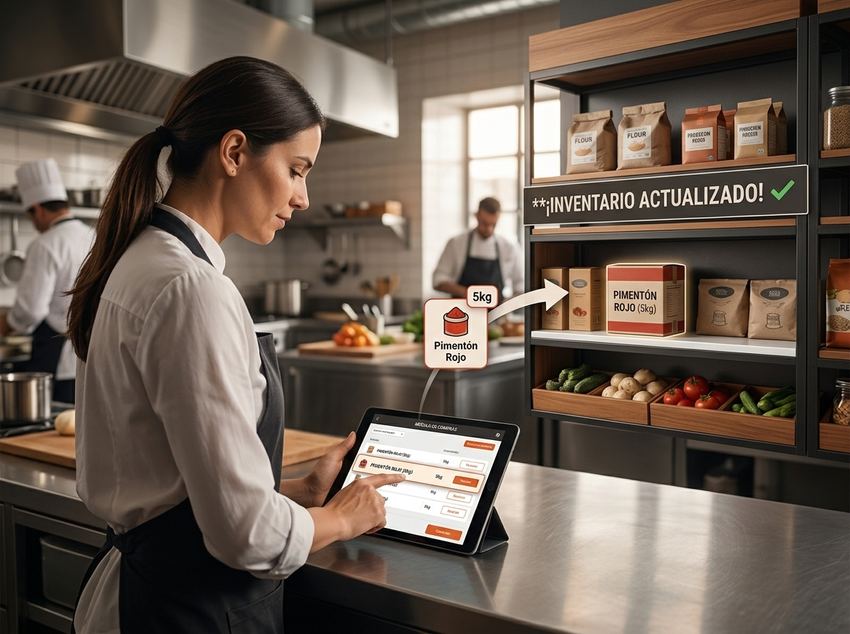
Your inventory updates itself
Every receipt adjusts stock and prices instantly
Goods receiving
Verify each delivery against the original purchase order. Log shortages, surpluses, or quality differences.
Request → receipt tracking
Follow the status of every order in real time: created, sent, in transit, received. Never lose track.
Purchase history
Browse the complete purchase history by supplier, ingredient, or period. Analyze spending trends over time.
Automatically updated inventory
When you confirm receipt, ingredient stock levels and prices update instantly across the entire system.
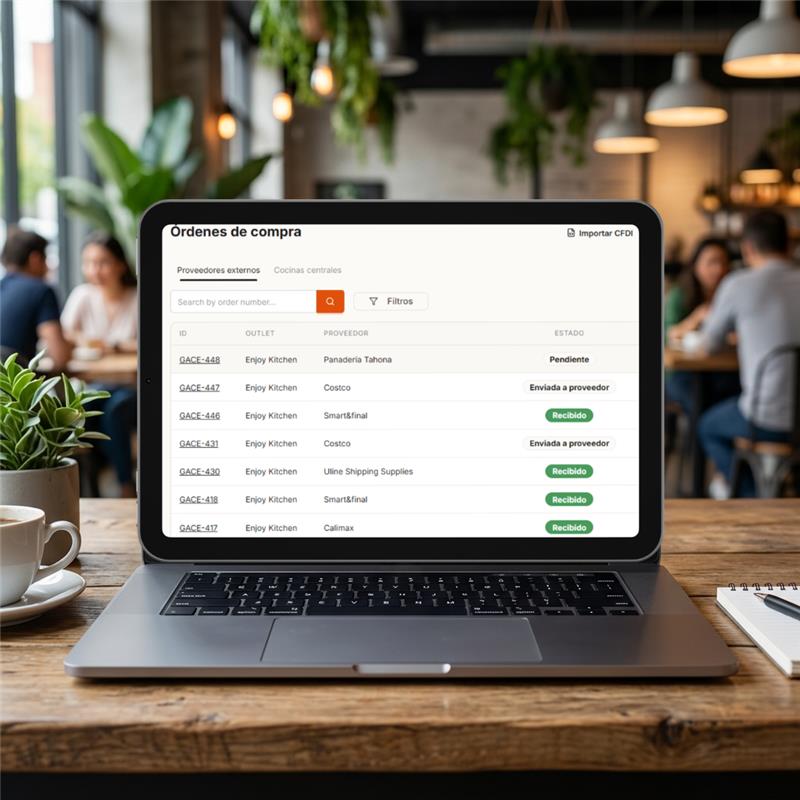
Purchase orders by supplier
Generate and send orders grouped by supplier
XML / SAT Integration
Import ingredients directly from the invoice
Upload your supplier's XML invoice and flamingOS automatically extracts each line item, updates prices, and records the incoming stock.
1
Upload the XML from the CFDI your supplier sent you.
2
flamingOS maps each line item to your registered ingredients and detects updated prices.
3
Confirm and you're done. Inventory updated, prices current, costs recalculated.
📄
CFDI_DistPacifico_20260321.xml
✓ Invoice processed successfully
→ 5 ingredients identified and mapped
→ 2 prices updated (Avocado +3.2%, Lime -1.8%)
→ Inventory automatically increased
→ 12 recipes recalculated with new costs
→ 5 ingredients identified and mapped
→ 2 prices updated (Avocado +3.2%, Lime -1.8%)
→ Inventory automatically increased
→ 12 recipes recalculated with new costs
Plans & pricing
Start free.
Scale when you're ready.
Switch plans whenever you need to.
Results
The impact of smarter purchasing
Less waste, better prices, fully traceable flow.
30%
less waste from over-purchasing
85%
less time generating orders
100%
traceability from request to receipt
$0
undetected discrepancies with XML
Frequently asked questions
Everything about purchasing management
How does flamingOS generate automatic shopping lists?
Three inputs: current inventory, defined minimum levels, and upcoming production plan. flamingOS calculates what you need to buy, groups it by supplier, and the list is ready to send.
Can I receive goods against SAT XML invoices?
Upload the supplier CFDI XML and flamingOS extracts every line, maps items to your ingredients, and detects new prices. You confirm receipt — inventory updates instantly, no manual entry.
Does flamingOS detect differences between ordered and delivered?
Each order line records the ordered, received, and accepted quantity. Differences stay visible for your claim or payment adjustment.
Can I see purchase history by supplier?
Browse order history by supplier, period, or location. Every order keeps line-item detail, prices, and receipt dates — analyze your spending over time.
Buy with total clarity
Start today and automate your purchasing from the shopping list all the way to receipt.